
Kubernetes is an open-source container orchestration engine that is used to automate containerized application deployment, scaling, and administration. It is an open-source management platform that can be used to manage containerized workloads and services, as well as declarative configuration and automation.
Kubernetes is a framework for running distributed systems in a resilient manner. It handles scaling and failover for your application and provides deployment patterns and other features. It has these characteristics.
- Service discovery and load balancing
- Storage orchestration
- Automated rollouts and rollbacks
- Automatic bin packing
- Self-healing
- Secret and configuration management
What Are Kubernetes Pods?
Pods are the smallest and most fundamental deployable objects in Kubernetes. In your cluster, they represent a single instance of a running process. Pods may contain one or more containers, such as Docker containers, and when there are several containers in a pod, they are operated by a single entity and share the pod’s resources.
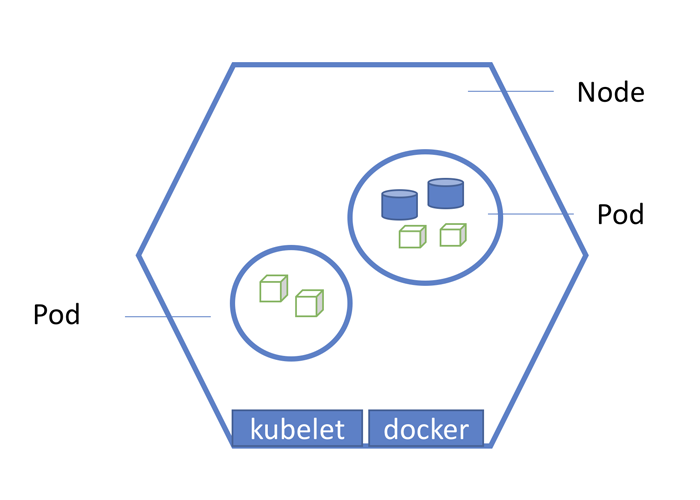
You can share k8s resources among the containers running inside the pods, such as volume, secrets, or config maps, and you can consider them self-contained, independent “logical hosts” that hold the application’s system demands. Pods run on nodes in the Kubernetes cluster, and once formed, they stay on that node until their process is finished. The pods on the nodes are automatically scheduled for deletion if a node with the pod fails.
What Is a Pod Lifecycle?
While pods are transitory and not designed to run indefinitely, they cannot be resurrected once terminated. These are the stages that a pod can go through.
- Pending: Although the pod has been deployed and accepted by the cluster, one or more of its containers have yet to start.
- Running: All the containers have been deployed, at least one is running, and the pod has been connected to a node.
- Succeeded: All of the containers in the pod have completed their tasks and will not be resumed.
- Failed: All the containers in the pod have been terminated, with at least one of them terminating in failure. It fails when it exists with a non-zero status
- Unknown: The pod’s status is yet to be confirmed.

How Do Pod-related Errors Happen?
There are several types of errors that can occur in Kubernetes, including the following:
- ImagePullBackOff: This error commonly happens when Kubernetes cannot retrieve the images for one of the pod’s containers. Usually, this occurs because the picture name is invalid, you mistyped it, or the image you’re trying to access belongs to a private registry.
- RunContainerError: This error occurs when the container is unable to start even before the container’s apps do. This is frequently caused by permissions on the volumes.
- Resources Error: When the cluster’s resources, like CPU and memory, are insufficient to run the pods, or when the namespace resource quota has been exceeded, the pods are classified as pending.
What is the CrashLoopBackOff error?
CrashLoopBackOff means that you have a pod in the node that is starting, crashing, starting again, and then crashing again. The CrashLoopBackOff error occurs when a process in your container stops working. The container’s process starts to fail. If you’re familiar with Kubernetes clusters, you can imagine how serious this issue is.
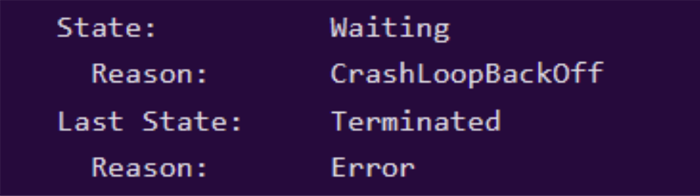
The “reason” attribute in the following screenshot plainly states that the container was terminated due to “CrashLoopBackOff”.
It’s also pretty hard to come across this type of problem because we don’t have sufficient documentation. Official Kubernetes documents attempt to address this issue. However, you need to know how to view pod logs to follow them.

Why Does CrashLoopBackOff Error Occur?
Kubernetes CrashLoopBackOff error can be caused by a variety of factors:
- Including a user executing a server that fails to load the configuration file (similar to CreateContainerConfigError when you can’t reach configmap)
- Users attempting to deploy services/applications that have already failed due to a lack of access to other services, or referring to scripts or binaries that are not present on the container
- An issue with the init-container setup in Kubernetes
- An application inside the container keeps crashing.
- The pod or container has been configured incorrectly.
How To Fix CrashLoopBackOff in Kubernetes?
To resolve this, Kubernetes keeps restarting the pods. However, there’s a chance something is wrong with your Kubernetes process. In such a scenario, restarting a pod won’t help. So, we’ll have to hunt for other solutions.
Suppose some binaries or scripts are missing from the image or application that the user wants to execute on Kubernetes. We can provide those files if the application’s configuration isn’t correct and we need to troubleshoot it.
Kubernetes can have its own deployment. This is possible with the aid of a blocking command. When additional deployments occur, those resources can continue to use the image, but the user has the ability to override them with blocking commands like sleep infinity.
Syntax
Command: [“sleep”,”infinity”]
This command is useful for blocking and avoiding the CrashLoopBackOff issue.
This will enable the pod’s terminal to be used for additional debugging and allow the pod to continue indefinitely. With the “kubectlexe” command, we may access the terminal.

As soon as the terminal is up and running, we may begin troubleshooting.
How to Prevent CrashLoopBackOff?
Docker’s containers are not all made equal. Entrypoint and Cmd can be paired in the Dockerfile. Docker gives us the ability to specify Entrypoint and Cmd. Let’s have a look at what they are.
- Entrypoint: These are the instructions that are used to configure how the container will run. These are similar to CMD in that you must specify the command and parameters.
- Cmd: It’s where the arguments for the Entrypoint are passed. Because Dockerfile does not impose any restrictions, we can set Cmd without the entrypoint.
Note: Both Kubernetes and Docker have their own naming conventions.
So, before working with someone else’s containers, double-check the intended Docker Entrypoint and Docker Image Cmd.
If you’ve produced a Docker image using a Dockerfile, you’re already familiar with Entrypoint and Cmd. You must either declare the Entrypoint and Cmd from the beginning or inherit them from a base image that already has these properties specified.
If you’re utilizing someone else’s container or inheriting a base image that doesn’t have a Dockerfile, you can follow the steps outlined below to use those files to obtain the values.
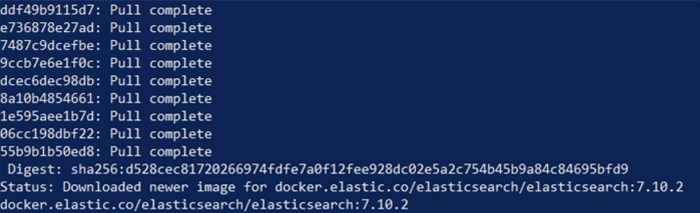
Docker pull
This will help pull the container locally.

Result:
Docker inspect
This step gives us detailed information about the image. So, from here, we can fetch the Entrypoint and Cmd details.

Result:
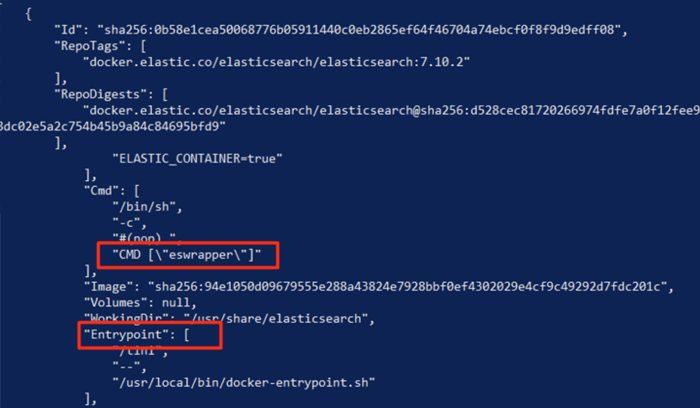
You can debug the service’s not staying running by updating the deployment and setting the container Entrypoint on sleep infinity.
Conclusion
CrashLoopBackOff is a result of a fairly typical misconfiguration of Kubernetes pods. It causes a lot of confusion since there is no one-size-fits-all approach to troubleshooting it. However, there are certain debugging techniques that can be employed to solve this problem. Simply employing those debugging techniques will assist you in learning how to avoid issues of this nature in the future.