
What Is Kubernetes?
Kubernetes is an open-source container orchestration platform that can automate the deployment, scaling, and operation of application containers. Developed by Google and now maintained by the Cloud Native Computing Foundation (CNCF), Kubernetes helps manage clusters of hosts running Linux containers.
Kubernetes enables developers to deploy applications in a predictable, repeatable manner. It abstracts the underlying infrastructure, allowing applications to run in various environments, whether on-premises, in public or private clouds, or in hybrid setups. Kubernetes simplifies the complexities of managing containers, handling tasks like load balancing, scaling, and resource allocation.
This is part of a series of articles about Kubernetes management
Complexity of Kubernetes Management and Why Graphic User Interfaces (GUIs) Are Important
Managing Kubernetes can be challenging due to its inherent complexity. Kubernetes involves a variety of components such as nodes, pods, services, and persistent storage, all of which require careful configuration and monitoring. Additionally, working with Kubernetes requires deep knowledge of YAML configuration files, command-line tools, and APIs. As environments scale and evolve, maintaining consistent performance, security, and resource efficiency becomes even more difficult.
GUI tools address these challenges by providing visual interfaces that simplify the management of Kubernetes clusters. They reduce the need for deep technical expertise, allowing users to interact with clusters more intuitively. GUIs enable real-time monitoring, troubleshooting, and configuration, reducing the risk of errors and accelerating workflows. For teams managing large or multi-cluster setups, GUIs offer centralized control and enhanced accessibility, making Kubernetes more manageable for developers, operators, and administrators alike.
For larger organizations, the Kubernetes GUI category now extends beyond dashboards into AI SRE platforms that combine visual cluster context with guided troubleshooting, automation, drift detection, cost optimization, and fleet-wide governance.
Key Features of Kubernetes GUI Tools
Kubernetes GUI tools typically include the following features:
- Cluster management: Offer a centralized interface for managing all aspects of a Kubernetes cluster, including node management, resource allocation, and health monitoring. Users can easily add or remove nodes, monitor node performance, and manage the distribution of workloads across the cluster.
- Deployment and configuration: Provide intuitive interfaces for deploying applications, configuring services, and managing updates. They allow users to define and deploy complex applications using visual workflows, reducing the complexity associated with YAML configuration files. Users can easily manage deployments, rollbacks, and updates.
- Monitoring and logging: Offer comprehensive monitoring and logging features that help users track the state of their clusters and diagnose issues. GUIs provide visual dashboards that display key metrics such as CPU usage, memory consumption, and network activity. They integrate with logging tools to offer insights into application logs.
- Kubernetes RBAC: Regulates access to resources based on user roles. Kubernetes GUI tools enhance RBAC management by providing a visual interface for defining and assigning roles and permissions. Administrators can easily create and manage roles, assign permissions to users or groups, and enforce security policies.

Tips from the expert

Itiel Shwartz
Co-Founder & CTO
Here are a few tips that can help you make better use of Kubernetes GUIs:
Use role-based dashboards:
Customize dashboards for different user roles (e.g., developers, operators, admins) to ensure they have the specific views and controls they need. This improves efficiency and security by limiting access to only what is necessary for each role.
Automate repetitive tasks with templates:
Create and use templates for common configurations and deployments. This reduces manual errors and accelerates the setup of new services or applications within your cluster.
Customize and extend the GUI:
Take advantage of the plugin architectures provided by some Kubernetes GUIs to add custom functionalities or integrate with other tools specific to your workflow. This can greatly enhance productivity and usability.
Integrate cost monitoring into workflows:
For platforms like Komodor that offer cost optimization features, set up automated reports and alerts for resource usage anomalies. This helps teams maintain budgets and scale efficiently.
Develop multi-cluster best practices:
When using tools with multi-cluster support, standardize tagging and labeling across clusters for easier identification. This makes navigation and troubleshooting more efficient.
Notable Kubernetes GUIs Tools
Kubernetes GUI Tools Compared
For most teams, the best Kubernetes GUI is not just the tool with the cleanest interface. The right choice depends on whether you need open-source cluster visibility, developer-friendly desktop access, enterprise-grade governance, multi-cluster operations, or AI-assisted troubleshooting.
| Kubernetes GUI tool | Best choice when you need… | Tool type | Open source or commercial | Multi-cluster support | Access model | AI or automation features | Governance features | Best-fit team |
|---|---|---|---|---|---|---|---|---|
| Komodor | Enterprise Kubernetes reliability, troubleshooting, AI SRE, and fleet visibility | Enterprise Kubernetes operations platform | Commercial | Yes | Read/write | Strong AI-assisted troubleshooting, workflow automation, change intelligence, and reliability insights | RBAC, SSO, audit trails, team controls, governance workflows | SRE, platform, DevOps, and enterprise engineering teams |
| Headlamp | A maintained open-source replacement for Kubernetes Dashboard | Kubernetes dashboard | Open source | Yes | Read/write according to Kubernetes permissions | Plugin-based extensibility | RBAC-aware interface | DevOps and platform teams that want an open-source Kubernetes UI |
| Lens | A desktop Kubernetes IDE for engineers working across clusters | Desktop IDE | Commercial with free options | Yes | Read/write | Productivity and AI-assisted features depending on version/plan | Team management and access features in paid plans | Developers, DevOps engineers, and platform teams |
| Rancher | Centralized Kubernetes management across many clusters and environments | Enterprise management platform | Open source core with commercial support | Yes | Read/write | Cluster provisioning, lifecycle, policy, and operational automation | Strong RBAC, policy controls, access management, and cluster governance | Enterprises running Kubernetes across cloud, on-prem, and edge environments |
| Portainer | Managing Kubernetes and container environments through a governed UI | Container management dashboard | Commercial with community edition | Yes | Read/write | Templates, environment management, and operational controls | RBAC, team access, environment controls, and governance features | Teams managing Kubernetes, Docker, and broader container infrastructure |
| Aptakube | A lightweight desktop GUI for quickly inspecting and managing clusters | Desktop GUI | Commercial | Yes | Read/write | Limited automation; focused on speed and usability | Uses existing Kubernetes permissions | Individual engineers and small teams that want a fast desktop Kubernetes GUI |
| K9s | A keyboard-driven Kubernetes interface in the terminal | Terminal UI | Open source | Yes, through kubeconfig contexts | Read/write | Limited automation; optimized for terminal operations | Uses Kubernetes RBAC | Engineers who prefer terminal-first cluster management |
1. Komodor

Komodor is an autonomous AI SRE platform for Kubernetes that gives enterprise teams a visual, operational layer for managing Kubernetes at scale. Instead of acting as a basic dashboard, Komodor helps teams visualize cluster health, investigate incidents, identify risky changes, optimize costs and performance, and manage complex Kubernetes environments across clusters, teams, and workloads.
Powered by Klaudia, Komodor connects Kubernetes GUI visibility with AI-assisted operations. Teams can use it to move from reactive firefighting to guided troubleshooting, faster root cause analysis, fleet-wide reliability management, drift detection, upgrade readiness, and safer Day-2 Kubernetes operations.
For enterprises running multiple clusters, Komodor is especially useful because it combines Kubernetes visibility, AI SRE workflows, RBAC, SSO, audit trails, cost and performance optimization, and operational context in one platform. This makes it a better fit for mature platform, DevOps, and SRE teams than a lightweight dashboard that only shows cluster resources.
Key features:
- AI SRE workflows: Komodor uses Klaudia to support AI-assisted Kubernetes operations, helping teams investigate issues, understand what changed, and move faster from alert to action.
- Fleet visibility: Teams can view Kubernetes health, workloads, services, deployments, and operational risks across complex multi-cluster environments.
- Guided troubleshooting: Komodor helps engineers investigate incidents with context about events, changes, dependencies, affected services, and likely root causes.
- Drift detection: Teams can identify configuration drift and environment inconsistencies that make large-scale Kubernetes operations harder to control.
- EOL and version awareness: Komodor helps teams track Kubernetes version status, end-of-life risk, and upgrade readiness across their cluster fleet.
- Deprecated API visibility: Teams can detect deprecated Kubernetes APIs before upgrades, reducing the risk of broken workloads during version changes.
- Upgrade readiness: Komodor helps platform and SRE teams understand whether clusters, workloads, and APIs are ready for Kubernetes upgrades.
- Cost and performance optimization: Teams can review resource usage trends, identify waste, right-size workloads, and reduce costs without compromising performance.
- RBAC, SSO, and auditability: Komodor supports enterprise governance with role-based access controls, SSO, and audit trails for safer Kubernetes operations.
Best for: Enterprise platform, DevOps, and SRE teams that need AI-assisted Kubernetes operations, multi-cluster visibility, guided troubleshooting, governance, cost optimization, drift detection, and upgrade readiness.
Not best for: Teams that only need a simple open-source dashboard for viewing a single local or test cluster.
Learn more about Komodor’s autonomous AI SRE platform for Kubernetes

2. Headlamp
Headlamp is a user-friendly, open-source Kubernetes UI focused on extensibility. It gives teams a visual way to inspect and manage Kubernetes clusters without relying only on kubectl, and it is one of the strongest current alternatives to the deprecated Kubernetes Dashboard.
Headlamp is a CNCF Sandbox project, and CNCF describes it as an extensible open-source multi-cluster Kubernetes user interface. It can run as a desktop application or as a web application deployed in-cluster, making it flexible for individual engineers, platform teams, and organizations that want a Kubernetes-native UI without adopting a full commercial platform.
Key features:
- CNCF Sandbox project: Headlamp is part of the CNCF Sandbox and is built as an open-source Kubernetes UI.
- Multi-cluster visibility: Teams can use Headlamp to work with multiple Kubernetes clusters through one interface.
- Extensible plugin system: Headlamp supports plugins, so teams can customize the UI, add functionality, and adapt it to their internal platform needs.
- Desktop and web options: It can be used as a local desktop app or deployed as an in-cluster web UI.
- RBAC-aware controls: Headlamp reflects the user’s Kubernetes permissions, so available actions depend on what the user is allowed to do in the cluster.
- Better Kubernetes Dashboard alternative: For teams looking for a maintained open-source UI, Headlamp is a stronger current choice than Kubernetes Dashboard.
Best for: Teams that want a maintained, open-source Kubernetes GUI with multi-cluster support, plugin extensibility, and a Kubernetes-native user experience.
Not best for: Teams that need a full enterprise Kubernetes operations platform with AI-assisted troubleshooting, fleet-wide reliability workflows, cost optimization, incident context, and deeper governance features.
3. Lens

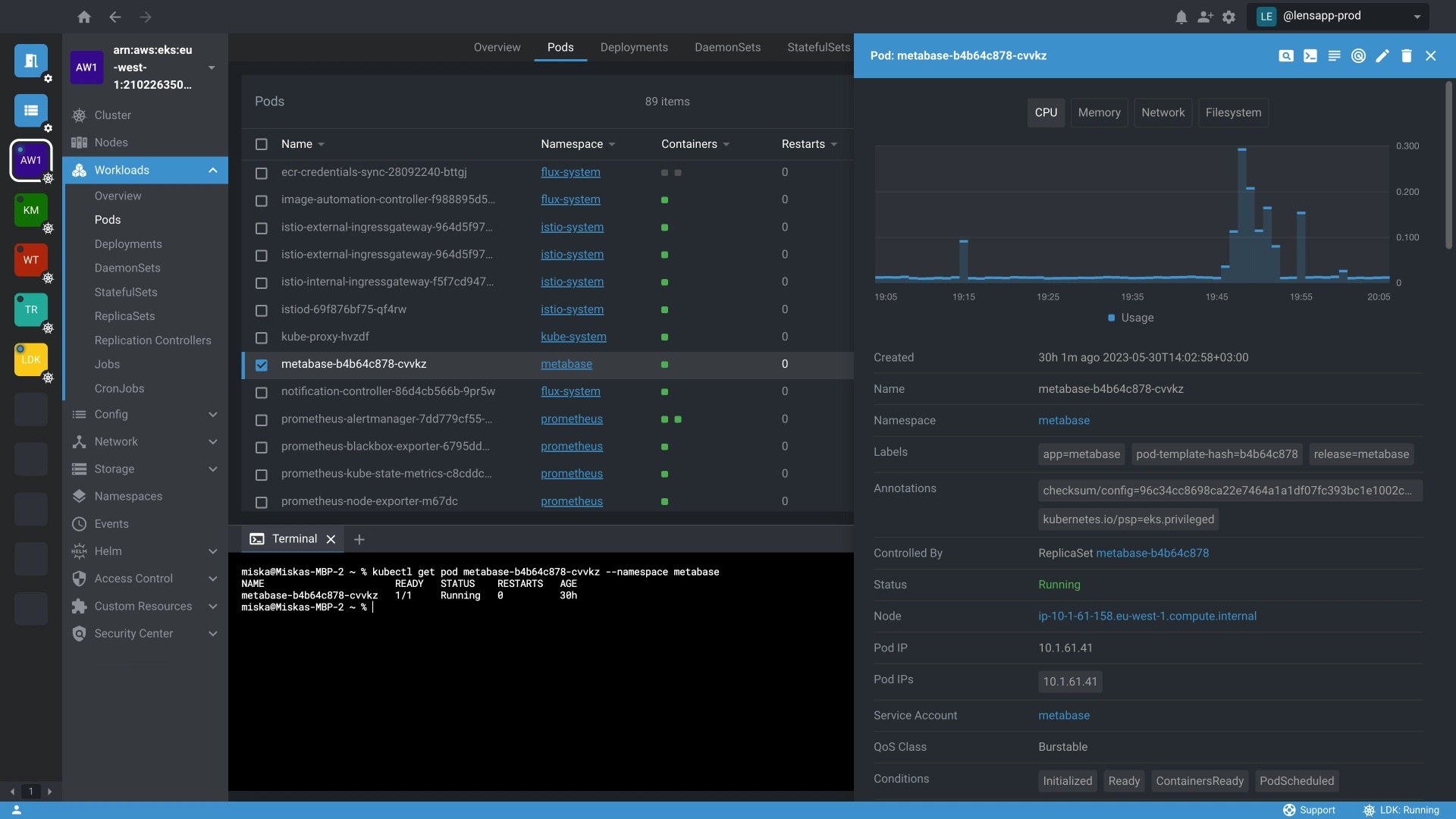
Lens is a Kubernetes Integrated Development Environment (IDE) for developers and DevOps engineers. It offers a context-aware user interface that simplifies the management and troubleshooting of Kubernetes clusters. Lens is optimized for handling large-scale clusters.
Key features:
- Real-time insights: Offers real-time monitoring of workloads and resources, allowing users to see performance metrics, resource utilization, and system health instantly.
- Multi-cluster connectivity: Supports connectivity to multiple Kubernetes clusters. Users can switch between clusters for centralized management.
- Resource navigation: Users can explore nodes, pods, services, and other resources with ease, providing a clear understanding of the cluster’s structure and state.

Source: Lens
4. Cyclops

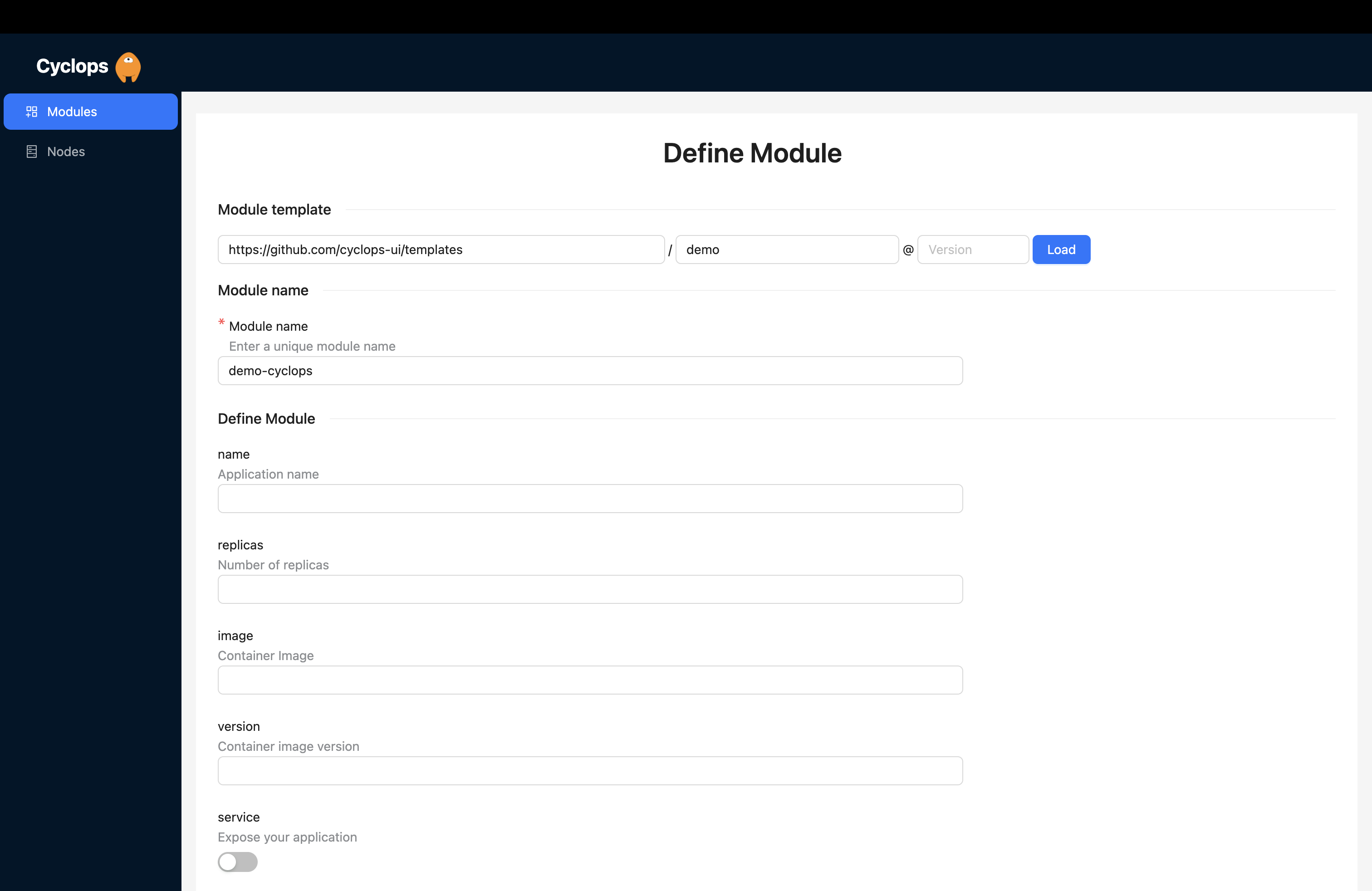
Cyclops is a web-based tool for simplifying the management of distributed systems, with a focus on Kubernetes. It abstracts complex Kubernetes configurations into user-friendly web forms, allowing developers and IT teams to deploy and manage applications more efficiently.
Key features:
- Dashboard: Provides an overview of the cluster’s health, performance, and resource utilization. Users can monitor key metrics and information about pods, nodes, deployments, and services.
- Deployment and scaling: Enables users to deploy and scale applications easily. Its interface allows for the creation, management, and updating of deployments, including adjusting the number of replicas and configuring rolling updates.
- YAML templates: Users can create templates of YAML configuration files with variables that can be assigned later.
- Template versioning: Supports versioning of YAML templates, allowing users to track changes and updates over time.

Source: Cyclops UI
5. Rancher

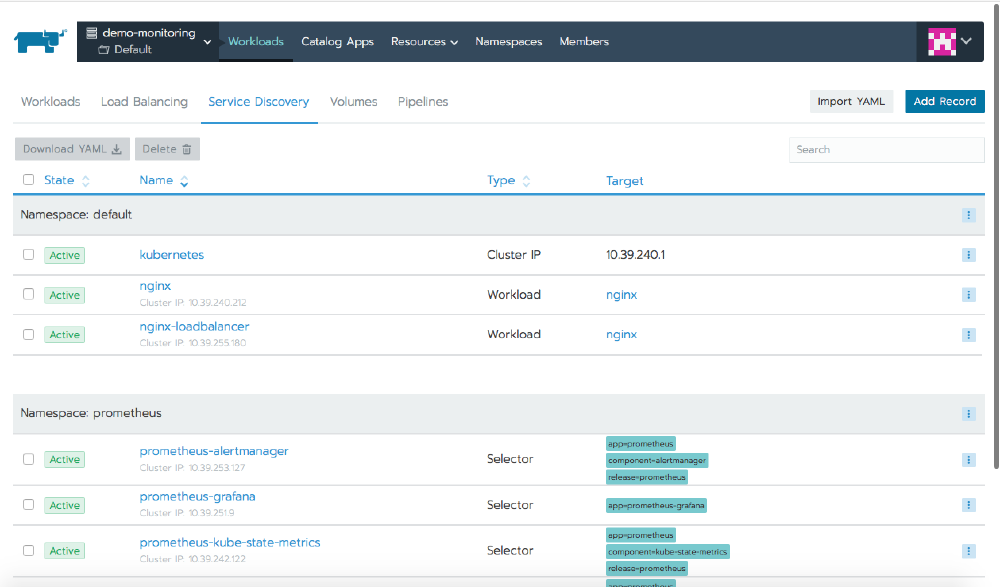
Rancher is a Kubernetes management platform that simplifies the deployment, management, and scaling of Kubernetes clusters across different infrastructure. It supports multi-cloud, on-premise, and hybrid setups, giving organizations flexibility in their Kubernetes environments.
Rancher enhances operational efficiency by offering centralized authentication, access control, and monitoring across all clusters, while maintaining compatibility with CNCF-certified Kubernetes distributions. It is available under the Apache 2.0 open-source license.
Key features:
- Multi-cluster management: Enables the management of multiple Kubernetes clusters across different environments from a single pane of glass. Users can provision, upgrade, and scale clusters across public clouds, private data centers, and edge locations.
- RBAC and access control: Provides centralized role-based access control across all clusters.
- Application catalog: Integrates with Helm, allowing users to deploy applications from Helm charts, along with Rancher’s own curated application catalog.
- Integrated monitoring and alerts: Offers built-in monitoring and alerting with Prometheus and Grafana, enabling real-time insights into cluster health, resource utilization, and performance metrics.
- Security and governance: Improves security by implementing cluster-wide policies for network segmentation, security, and governance, ensuring that Kubernetes environments comply with organizational standards.
- Cluster provisioning: Supports provisioning and scaling of Kubernetes clusters across various infrastructures, including bare metal, VMware, and major public clouds like AWS, Azure, and Google Cloud.

Source: Rancher
6. Kubevious

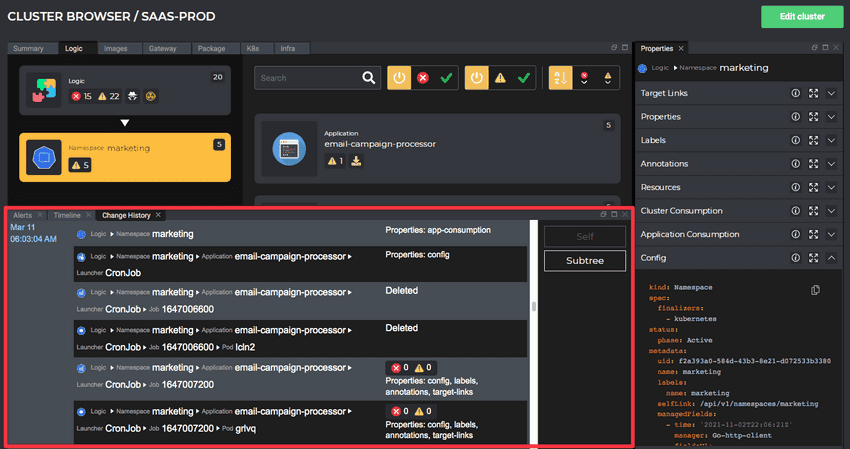
Kubevious is a visual tool to simplify the management and troubleshooting of Kubernetes environments. It provides a web-based user interface that offers visibility into complex Kubernetes configurations, making it easier for users to detect and resolve misconfigurations.
Key features:
- Visual insights: Kubevious provides a graphical representation of Kubernetes objects and their relationships, making it easier to understand how different components are interconnected and configured within the cluster.
- Misconfiguration detection: Automatically detects and flags common configuration errors, such as resource limits, missing labels, or security vulnerabilities, helping users ensure that Kubernetes resources are set up properly.
- Policy enforcement: Allows users to define custom rules and policies that ensure compliance with organizational standards. Kubevious continuously monitors clusters to enforce these policies and prevent drift.
- Time Machine: Enables users to view the historical state of the cluster, allowing them to troubleshoot issues by comparing current configurations with previous ones.
- RBAC visibility: Provides detailed insights into RBAC configurations, helping administrators ensure that proper permissions are in place and no unintended access is granted.
- Human-readable YAML: Translates complex Kubernetes configurations into easily understandable, human-readable formats, making it easier for users to review and edit YAML files.

Source: Kubevious
7. Kubernetes Web View
Kubernetes Web View is an open-source, read-only web-based interface for viewing and inspecting Kubernetes clusters. It provides users with a simplified way to explore cluster resources without allowing modifications, making it suitable for monitoring or auditing purposes. It is available under the GPL-3.0 license.
Key features:
- Read-only access: Offers a non-intrusive way to explore Kubernetes clusters, ensuring that users can inspect resources without the risk of making changes.
- Resource overview: Displays detailed information about Kubernetes resources such as pods, services, deployments, and nodes, giving users a clear snapshot of the cluster’s current state.
- Multi-cluster support: Supports viewing multiple Kubernetes clusters from a single interface, making it easier to monitor different environments.
- Minimal setup: Lightweight and easy to deploy, can be set up quickly, providing immediate visibility into clusters without heavy infrastructure requirements.
- Security focused: With its read-only design, limits access to viewing resources only, helping maintain strict security boundaries while allowing visibility into cluster operations.
Conclusion
Kubernetes GUI tools play a vital role in simplifying the management and operation of Kubernetes clusters. They provide an intuitive and visual approach to deploying, monitoring, and managing applications, reducing the complexity associated with Kubernetes. By offering features such as real-time insights, multi-cluster management, and simplified configuration, these tools enhance productivity, improve operational efficiency, and make Kubernetes more accessible to a wider range of users, from developers to system administrators.
FAQs About Kubernetes GUI Tools
Yes. Headlamp is one of the best open-source alternatives to Kubernetes Dashboard because it is actively positioned as a modern, extensible Kubernetes UI with multi-cluster support, plugin customization, RBAC-aware controls, and both desktop and web deployment options. It is especially useful for teams that want a maintained open-source Kubernetes GUI without adopting a full commercial platform.
The best alternative to Kubernetes Dashboard is Headlamp. It is a maintained, open-source Kubernetes UI focused on extensibility, and CNCF describes it as an extensible open-source multi-cluster Kubernetes user interface. It is a good fit for teams that want a Kubernetes-native dashboard without adopting a full commercial platform.
No. Kubernetes Dashboard is deprecated and unmaintained. The Kubernetes website issue for the Dashboard documentation states that the project has been archived and is no longer actively maintained, and that new installations should consider Headlamp instead.
Yes, for new Kubernetes GUI deployments, Headlamp is the better choice. Kubernetes Dashboard is deprecated and unmaintained, while Headlamp is a maintained Kubernetes UI focused on extensibility, multi-cluster visibility, plugins, and modern Kubernetes workflows. Teams may still encounter Kubernetes Dashboard in older environments, but it should not be the default choice for new setups.
A Kubernetes GUI is the broad category for visual tools that help users inspect, manage, or troubleshoot Kubernetes environments. A dashboard usually focuses on visualizing cluster resources, workloads, namespaces, pods, services, and events. An IDE is more engineer-focused and usually supports faster cluster navigation, editing, and developer workflows. A management platform goes deeper, adding multi-cluster operations, governance, access control, reliability workflows, automation, cost optimization, and enterprise operational context.
K9s is not a traditional browser-based Kubernetes GUI. It is a terminal-based UI for interacting with Kubernetes clusters. It helps engineers navigate, observe, and manage Kubernetes resources from the command line, so it fits best as a terminal UI alternative rather than a standard graphical dashboard.
For open-source multi-cluster visibility, Headlamp is a strong choice because CNCF describes it as an extensible open-source multi-cluster Kubernetes UI. For enterprise multi-cluster operations, Komodor is usually a better fit because it combines Kubernetes visibility with AI SRE workflows, troubleshooting, optimization, and operations at scale.
Komodor is the strongest fit for enterprise Kubernetes operations because it goes beyond a basic GUI. It is positioned as an autonomous AI SRE platform for Kubernetes that helps teams visualize, troubleshoot, and optimize cloud-native infrastructure at scale. This makes it better suited for SRE, platform, DevOps, and enterprise engineering teams that need fleet visibility, guided troubleshooting, governance, auditability, and AI-assisted operations.